I Switched to the Mx Mechanical and Here is What Happened
The landscape of productivity peripherals has undergone a significant transformation over the last decade. For a long time, the market was bifurcated: mechanical keyboards were the domain of gamers and enthusiasts who favored high-actuation profiles and RGB lighting, while office professionals were steered toward slim, membrane-based chicklet keyboards. The introduction of the Mx Mechanical represented a deliberate attempt to bridge this divide. By merging the tactile precision of mechanical switches with the sober, streamlined aesthetic of professional office gear, this device has forced a re-evaluation of what a workstation keyboard can be. Transitioning to this hardware isn’t just a change in equipment; it is a shift in the sensory experience of a workday.
For those accustomed to the uniform, shallow travel of laptop keys or traditional membrane office boards, the first few hours with a mechanical alternative can feel alien. However, the move to the Mx Mechanical typically stems from a specific set of frustrations: fatigue from bottoming out keys, a lack of tactile feedback that leads to typing errors, or the desire for a more durable tool that can withstand heavy daily use. This analysis explores the nuances of that transition, examining how the device integrates into a professional workflow and whether the mechanical "click" truly translates to increased efficiency in a corporate environment.
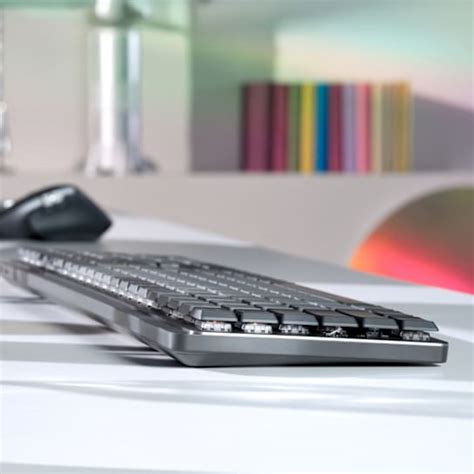
The design philosophy of the Mx Mechanical is rooted in the "low-profile" movement. Traditional mechanical keyboards are often tall, necessitating a wrist rest to prevent strain. By utilizing low-profile switches, this keyboard maintains a slim height while still offering significantly more travel than a standard membrane board. This structural choice is the foundation of its appeal, offering the benefits of mechanical feedback without the ergonomic baggage of vintage-style keyboards. As users integrate this into their desks, the immediate impact is often found in the posture of the hands and the deliberate nature of every keystroke.
The Anatomy of the Experience: A Detailed Product Analysis
When analyzing the Mx Mechanical, one must first look at the switch options, as the choice between Tactile Quiet (Brown), Linear (Red), and Clicky (Blue) switches fundamentally dictates the user experience. The Tactile Quiet variant is perhaps the most common choice for those switching from traditional office environments. It provides a noticeable physical "bump" at the point of actuation, allowing the typist to know Exactly when a letter has been registered without needing to press the key into the base of the board. This reduces the force required for long-form writing or coding sessions, effectively minimizing finger fatigue over an eight-hour shift.
The build quality is another area where the transition is immediately felt. Most standard office keyboards are constructed primarily of plastic, which often results in a "mushy" feel and a resonant, hollow sound. The Mx Mechanical utilizes an aluminum top plate that provides structural rigidity. This weight ensures the keyboard stays anchored during intense typing sessions, and the metal surface offers a premium tactile feel that aligns with high-end laptops. The keycaps themselves feature a dual-color matte finish, which is designed to help the eye distalize between different function zones, a subtle but effective productivity aid for those who navigate complex software shortcuts.
Smart illumination is a feature that often surprises new users. Unlike the "set it and forget it" backlighting of many devices, the Mx Mechanical uses proximity sensors to detect when hands are approaching. The LEDs fade in as the user nears and dim when they depart, which is both a battery-saving measure and a sophisticated aesthetic touch. Furthermore, the ambient light sensor adjusts the brightness dynamically. For a buyer who frequently moves between a bright office and a dimly lit home studio, this automation removes a minor but persistent friction point from their daily routine.
Workflow Integration and Software Synergy
Hardware is only half of the story. The transition to the Mx Mechanical often involves a deep dive into customization software. For power users, the ability to remap the entire function row is where the real value lies. In a standard workflow, the keys F1 through F12 are rarely used to their full potential. Through software integration, these can be transformed into dedicated triggers for video conferencing mutes, screen capture tools, or specific application shortcuts like "New Layer" in Photoshop or "Compile" in a development environment. This transformation of the keyboard into a bespoke control deck is a hallmark of the high-end peripheral experience.
Find top-rated Electronics products at great prices.
Browse Now →Connectivity is another pillar of the professional experience. The ability to pair with up to three devices via Bluetooth or a dedicated 2.4GHz receiver is a significant upgrade for those managing a multi-device setup. Switching between a desktop, a laptop, and perhaps a tablet is handled with a single button press. During the transition, users often find that this feature alone cleans up their desk considerably, as they no longer need separate input devices for different machines. The stability of the connection is paramount; in a professional setting, input lag or dropped characters aren't just annoyances—they are productivity killers. The Mx Mechanical maintains a level of reliability that rivals a wired connection, which is a rare feat for wireless mechanical boards.
Battery life is often a concern for those moving to a wireless mechanical board, as the power draw of mechanical switches and backlighting can be substantial. However, the efficiency of the low-profile LEDs and the intelligent sleep modes mean that a single charge can last for weeks or even months with the backlight turned off. For the buyer who values a "cord-free" aesthetic but fears the constant need to recharge, this balance is a critical part of the long-term satisfaction with the device.
Pros and Cons of Making the Switch
- Pros: Exceptional Tactile Feedback - The low-profile mechanical switches provide a crisp, satisfying typing experience that increases speed and reduces errors compared to membrane keys.
- Pros: Versatile Connectivity - The ability to switch seamlessly between three devices makes it ideal for modern professionals who use multiple computers simultaneously.
- Pros: Premium Build Quality - The aluminum top plate and matte keycaps offer a durable, high-end feel that justifies the investment for long-term use.
- Pros: Customizable Shortcuts - Extensive software support allows users to tailor the function keys to their specific professional software, greatly enhancing efficiency.
- Pros: Ergonomic Low Profile - The slim design provides the benefits of a mechanical keyboard without requiring a steep learning curve or additional wrist support for most users.
- Cons: Acoustic Presence - Even the "Tactile Quiet" version is louder than a traditional membrane or laptop keyboard, which might be a consideration in very quiet, open-plan offices.
- Cons: Keycap Material - While the dual-tone aesthetic is professional, some enthusiasts prefer PBT plastic over the coated ABS used here, as ABS can develop a "shine" over years of heavy use.
- Cons: Portability - While slimmer than a standard mechanical board, the full-size version is still substantial in weight and footprint, making it less ideal for constant travel compared to ultra-portable alternatives.
Market Comparison: How It Stacks Up
To understand the impact of the switch, it is helpful to compare the Mx Mechanical against other common types of keyboards found in the professional space. The following table highlights the key differences that buyers typically weigh during their decision-making process.
| Feature | Mx Mechanical | Standard Membrane Office | Gaming Mechanical (Standard) | Laptop Chicklet (Modern) |
|---|---|---|---|---|
| Key Travel | Low-Profile (Medium) | Short to Medium | Deep (High) | Very Short |
| Switch Type | Mechanical (Low Profile) | Rubber Dome | Mechanical (Standard) | Scissor Switch |
| Durability | Very High (50M+ clicks) | Moderate | Very High | High (Mechanical parts) |
| Multi-Device Support | Yes (3 Devices) | Usually No | Standard for high-end | No (Built-in) |
| Software Customization | Extensive (Professional) | Minimal | Extensive (Gaming focus) | Moderate (System-level) |
The Professional Buying Guide: Is It Right for You?
Deciding to switch to a mechanical keyboard like the Mx Mechanical requires a clear understanding of your priorities and your environment. Not every professional needs a mechanical board, but for those who spend over four hours a day typing, the nuances of the tool become significantly more important. When considering this transition, the following factors should guide the decision.
Identify Your Typing Style
If you are a "heavy" typist who often hits the keys with significant force, you will benefit immensely from the mechanical switch's ability to absorb shock and provide clear feedback. Linear switches (Red) are great for those who want a smooth, unobstructed stroke, while tactile switches (Brown) are better for those who want to feel the exact moment the key registers. If you work in a private office and love the vintage typewriter feel, the Clicky (Blue) switches offer the most auditory and tactile feedback, though they are generally discouraged in shared workspaces.
Evaluate Your Desk Setup
The full-size Mx Mechanical includes a Numpad, which is essential for accountants, data analysts, and researchers. However, for those with limited desk space or those who prefer to keep their mouse closer to their typing center for better shoulder ergonomics, a "Mini" or TKL (Tenkeyless) version of the board might be a superior choice. Consider whether you truly use the Numpad enough to justify the extra width.
Consider Your Software Ecosystem
One of the strongest arguments for this specific hardware is its integration into a broader ecosystem of professional tools. If you already use a precision mouse designed for productivity, having a keyboard that shares the same receiver and customization software streamlines your setup. The ability to create "App-Specific" profiles is a game-changer. Imagine your keyboard automatically changing its shortcut layout when you switch from Excel to Microsoft Teams. If your work involves multitasking across disparate types of software, this level of automation is a significant buying factor.
Find top-rated Electronics products at great prices.
Shop Amazon →Eco-Awareness and Longevity
Modern buyers are increasingly concerned with the sustainability of their electronics. Mechanical keyboards are inherently more sustainable than membrane ones because they are built to last longer. While a cheap office keyboard might lose its elasticity and feel "dead" after a year or two of heavy use, mechanical switches maintain their feel for decades. Additionally, for the environmentally conscious, checking for certifications regarding recycled plastics and low-carbon aluminum in the construction process is a worthwhile step in the buying journey.
Real-World Use Cases
To truly understand what happens when you switch, consider the daily life of a software developer. Previously, they might have used a laptop keyboard that felt cramped, leading to frequent typos in syntax that caused builds to fail. Upon switching to the Mx Mechanical, the distinct tactile bump of the keys allows for a more rhythmic and accurate coding flow. The "Quiet Tactile" switches ensure they aren't distracting colleagues during a focused "sprint," while the backlight helps during late-night debugging sessions.
Contrast this with a digital content creator. This user might rely heavily on shortcuts for video editing. By remapping the function row to common commands like "Split Clip," "Render," or "Audio Gain," they move their hand away from the mouse less frequently. The result is a more fluid creative process where the tool becomes an extension of the mind rather than a hurdle to be cleared. In both cases, the "switch" isn't just about the hardware—it's about the optimization of the human-computer interface.
Natural Evolution of the Workspace
The journey of switching to the Mx Mechanical often starts as a search for a better typing experience but ends as an overhaul of one's digital habits. What happens is a subtle but profound shift: typing becomes less of a chore and more of a deliberate, satisfying action. The physical feedback loop provided by the mechanical switches creates a sense of "digital craftsmanship" that membrane boards cannot replicate. As users move away from shallow, mushy laptop keys, they often find that their accuracy improves, their hands feel less strained at the end of a long day, and their desk looks more like a curated professional environment.
While the transition does require a short adjustment period—learning the slightly increased travel distance and managing the software customization—the long-term benefits for the high-volume typist are undeniable. It represents a move toward quality and durability in an era of disposable tech. By prioritizing ergonomics, connectivity, and tactile precision, this hardware serves as a reminder that the tools we touch most often have the greatest impact on our well-being and productivity. Whether in a home office or a corporate suite, the switch to a mechanical board designed for professionals is a step toward a more efficient and comfortable future.